 CADYCE
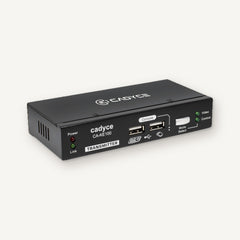
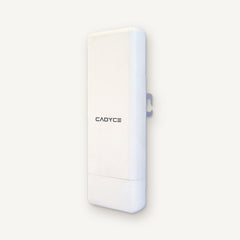
USB KVM Extender
Up to 100 m · Cat 5 / 5e / 6 cable · Up to 1920 x 1200
Today's price on WhatsAppMRP ₹19,990, incl. of all taxes
Ask on WhatsAppAdd what you need from any shelf. We quote the whole cart in one WhatsApp message.
Continue shoppingHave an account?
Log in to check out faster.
Shop by need
Start with the problem. We'll find the part.
Shop by brand
Shop by need · Connect a screen
Cables, adapters and docks that get a laptop or PC onto a monitor, a TV or a projector.
Find the right one
Answer a question or two and the shelf below sorts itself.
CADYCE
USB KVM Extender
Up to 100 m · Cat 5 / 5e / 6 cable · Up to 1920 x 1200 CADYCE
8 Port Rackmount HDMI KVM Switch
8 computers · Rackmount · HDMI 4K at 60 Hz
 CADYCE
4 Port USB KVM Switch
4 computers · VGA · USB keyboard and mouse
 CADYCE
8 Port Rackmount USB KVM Switch
8 computers · Rackmount · VGA
 CADYCE
4 Port HDMI USB KVM Switch
4 computers · HDMI 4K at 60 Hz · HDMI 2.0
 CADYCE
2 Port HDMI USB KVM Switch
2 computers · HDMI 4K at 60 Hz · HDMI 2.0
 CADYCE
2 Port USB KVM Switch
2 computers · VGA · USB keyboard and mouse
 CADYCE
16 Port Rackmount HDMI KVM Switch
16 computers · Rackmount · HDMI 4K at 60 Hz
 CADYCE
16 Port Rackmount USB KVM Switch
16 computers · 19 inch rackmount · VGA
 CADYCE
2 Port HDMI USB KVM Switch
2 computers · HDMI 3840 x 2160 · Fixed 1.2 m cables
 CADYCE
USB-C 3.1 Gen2 Sync & Charge Cable with Display Support, PD 100W
4K at 60 Hz · 100W PD · 10 Gbps
 CADYCE
USB-C to USB 3.0 Hub with HDMI 4K & Gigabit Ethernet
1 x HDMI · 4K at 60 Hz · 100W PD charging
 CADYCE
USB-C to HDMI 4K, VGA, Gigabit Docking Station
1 x HDMI · 1 x VGA · 4K at 30 Hz
 CADYCE
USB-C Keyboard & Docking Station
1 x HDMI · 1 x VGA · 4K at 30 Hz
 CADYCE
USB-C Professional Docking Station (DisplayLink)
2 x HDMI · 1 x DisplayPort · 4K at 30 Hz
 CADYCE
USB-C iPad Pro Docking Station
1 x HDMI · 4K at 30 Hz · 100W PD charging
 CADYCE
USB-C Multi-Function Dock for Surface Pro
1 x HDMI · 4K at 30 Hz · 45W PD charging
 CADYCE
USB-C Dual HDMI Cube Docking Station (DisplayLink)
2 x HDMI · 85W PD charging · 5 Gbps
 CADYCE
USB-C Enhanced Travel Docking Station
1 x HDMI · 4K at 60 Hz · 100W PD charging
 CADYCE
USB-C Dual HDMI & VGA Docking Station (DisplayLink)
2 x HDMI · 1 x VGA · 4K at 30 Hz
 CADYCE
USB-C Dual 4K HDMI & VGA Docking Station
2 x HDMI · 1 x VGA · 4K at 60 Hz
 CADYCE
USB-C Docking Station with 100W Charging (DisplayLink)
2 x HDMI · 1 x DisplayPort · 4K at 30 Hz
 CADYCE
USB-C 4K HDMI, 8K DisplayPort, USB-C & VGA Docking Station
1 x HDMI · 1 x DisplayPort · 1 x VGA
 CADYCE
USB-C Desktop Docking Station (for Laptop & All in One PC)
1 x HDMI · 1 x VGA · 4K at 30 Hz
 CADYCE
USB 3.0 Travel Docking Station (DisplayLink)
1 x HDMI · 1 x VGA · DisplayLink
 CADYCE
USB-C 14 in 1 Windows MST Docking Station
14 in 1 · 2 x HDMI · 1 x VGA
 CADYCE
Thunderbolt 3 HDMI Docking Station
1 x HDMI · 8K at 60 Hz · 100W PD charging
 CADYCE
Thunderbolt 3 DisplayPort Docking Station
1 x DisplayPort · 8K at 60 Hz · 60W PD charging
 CADYCE
Dual USB-C Mini Docking Station Compatible with Thunderbolt 3 Ports
1 x HDMI · 4K at 30 Hz · 100W PD charging
 CADYCE
HDMI Extender over Ethernet (50 m)
Up to 50 m · Full HD at 60 Hz · HDMI 1.4
 CADYCE
Dual USB-C Dual HDMI Docking Station
2 x HDMI · 4K at 60 Hz · 100W PD charging
 CADYCE
Dual USB-C Docking Station with Gigabit Ethernet
1 x HDMI · 4K at 30 Hz · 100W PD charging
 CADYCE
HDMI Extender over Ethernet (120 m)
Up to 120 m · Full HD at 60 Hz · HDMI 1.4
 CADYCE
5 x 1 HDMI Switch, 4K at 60 Hz, with Remote & Change-over Button
5 in / 1 out · Remote control · 4K at 60 Hz
 CADYCE
2-Port VGA Splitter with Full HD Support
1 in / 2 out · Full HD
 CADYCE
2 x 1 HDMI Switch with 4K Support
2 in / 1 out · 4K at 30 Hz · HDMI 1.4
 CADYCE
4-Port VGA Splitter with Full HD Support
1 in / 4 out · 4 x VGA · Full HD
 CADYCE
1 x 8 HDMI Splitter with 4K and 3D Support
1 in / 8 out · 3D · 8 x HDMI
 CADYCE
1 x 16 HDMI Splitter with 4K and 3D Support
1 in / 16 out · 3D · 4K at 60 Hz
 CADYCE
1 x 4 HDMI Splitter with 4K Support
1 in / 4 out · 4 x HDMI · 4K at 60 Hz
 CADYCE
VGA to HDMI Adapter with Audio, Full HD
1 x HDMI · Full HD · Audio supported
 CADYCE
USB-C to HDMI 4K & VGA Adapter
1 x HDMI · 1 x VGA · 4K at 30 Hz
 CADYCE
USB-C to HDMI (4K) Adapter with Audio
4K at 60 Hz · Audio supported · Plug and play
 CADYCE
USB-C to Full HD VGA Adapter
1 x VGA · Full HD at 60 Hz · Bus powered
 CADYCE
USB-C to Dual HDMI (4K at 60 Hz) Converter with 100W PD Charging
2 x HDMI · 4K at 60 Hz · 100W PD charging
 CADYCE
USB-C to HDMI (8K) Adapter with Audio
8K at 60 Hz · Audio supported · Bus powered
 CADYCE
USB-C to Dual DisplayPort (8K at 30 Hz) Converter
2 x DisplayPort · 8K at 30 Hz · 100W PD charging
 CADYCE
USB-C 3.1 to HDMI 4K at 60 Hz Multi-Port Converter
1 x HDMI · 4K at 60 Hz · 100W PD charging
 CADYCE
USB-C to 8K DisplayPort Adapter
8K at 60 Hz · Bus powered · Plug and play
 CADYCE
USB-C 3.1 to VGA Adapter
1 x VGA · Bus powered · Up to 6 on one computer
 CADYCE
USB-C to AV Multiport Adapter 4K
1 x HDMI · 4K
 CADYCE
USB to HDMI Adapter with Audio
Full HD · Audio supported · Bus powered
 CADYCE
USB 2.0 to VGA Display Adapter
Full HD · Bus powered
 CADYCE
USB 3.0 to HDMI Adapter with Audio
Full HD · Audio supported · Bus powered
 CADYCE
USB 3.1 USB-C to HDMI (4K) Converter with Audio
1 x HDMI · 4K at 60 Hz · 100W PD charging
 CADYCE
USB 3.0 to VGA Display Adapter
Full HD · Bus powered
 CADYCE
Thunderbolt to Dual HDMI Adapter
2 x HDMI · 4K at 60 Hz · Bus powered
 CADYCE
Thunderbolt to Dual DisplayPort Adapter
2 x DisplayPort · 5K at 60 Hz · Bus powered
 CADYCE
Mini DisplayPort to HDMI Adapter with Audio Support, Full HD
Full HD · Audio supported · Plug and play
 CADYCE
Mini DisplayPort to VGA Converter, Full HD
1 x VGA · Full HD · Bus powered
 CADYCE
HDMI to VGA Dongle, Full HD
Full HD
 CADYCE
HDMI to 4K DisplayPort Adapter with Audio
1 x DisplayPort · 4K at 60 Hz · Audio supported
 CADYCE
DisplayPort to VGA Adapter, Full HD
1 x VGA · Full HD at 60 Hz · Bus powered
 CADYCE
DisplayPort to Triple 4K HDMI Converter with Audio
3 x HDMI · 4K at 60 Hz · DisplayPort 1.4
 CADYCE
USB-C to HDMI (8K) Cable with Audio
8K at 60 Hz · Audio supported · 2 m cable
 CADYCE
DisplayPort to 4K at 30 Hz HDMI Converter with Audio
4K at 30 Hz · Audio supported
 CADYCE
USB-C to Mini DisplayPort Cable, 4K at 60 Hz
4K at 60 Hz · 1.8 m cable
 CADYCE
USB-C to 8K DisplayPort Cable
8K at 60 Hz · 1.8 m cable
 CADYCE
Ultra Thin Active HDMI Cable with Ethernet, 4K at 60 Hz
4K at 60 Hz · 5 m cable · Active
 CADYCE
USB-C 3.2 Gen2 Male to USB-C Male Active Optical Display Cable
4K at 30 Hz · 10 Gbps · 10 m cable
 CADYCE
USB-C to 4K HDMI Cable
4K at 30 Hz · 2 m cable
 CADYCE
High Speed HDMI Cable with Ethernet, 4K at 60 Hz
4K at 60 Hz · 2 m cable · HDMI 2.0
 CADYCE
Ultra Thin HDMI Cable with Ethernet, 4K at 60 Hz
4K · 2 m cable · 10.2 Gbps
 CADYCE
High Speed HDMI Copper & Braided Cable with Ethernet, 8K at 60 Hz
8K at 60 Hz · 4K at 120 Hz · 1.8 m cable
 CADYCE
High Speed 8K HDMI Fiber Cable with Ethernet
8K at 60 Hz · 10 m cable · Fibre optic
 CADYCE
High Speed HDMI Cable with Ethernet
4K at 60 Hz · 10 m cable · HDMI 2.0
 CADYCE
HDMI to USB-C Cable, 8K at 30 Hz / 4K at 144 Hz
8K at 30 Hz · 4K at 144 Hz · 1.8 m cable
 CADYCE
DisplayPort to HDMI Cable, 4K at 30 Hz
4K at 30 Hz · 1.8 m cable · HDMI 1.4
 CADYCE
HDMI to 4K DisplayPort Cable with Audio
4K at 60 Hz · Audio supported · 2 m cable
 Honeywell
Type C Docking Station 9 in 1
HDMI 4K · Gigabit Ethernet · SD and microSD
 Honeywell
Type C Docking Station 7 in 1
HDMI 4K · 1 x USB 3.0, 2 x USB 2.0 · SD and microSD
 Honeywell
Type C Docking Station 5 in 1
HDMI 4K · 3 x USB 3.0 · 100W PD
 Honeywell
Type C Docking Station 6 in 1
HDMI 4K · 3 x USB 3.0 · Gigabit Ethernet
 Honeywell
Type C Docking Station 10 in 1
Dual HDMI 4K and VGA · Gigabit Ethernet · SD and microSD
 Honeywell
Type C Docking Station 14 in 1
2 x HDMI and DP, 8K · 10 Gbps USB · Gigabit Ethernet
 Honeywell
Type C Docking Station 12 in 1
MagSafe wireless 15W · HDMI 4K · Gigabit Ethernet
 Honeywell
Type C Docking Station 11 in 1
Dual HDMI and DP, 4K · Gigabit Ethernet · SD and microSD
 Honeywell
Type C to HDMI with PD Charging and USB 3.0 Adapter
HDMI 4K at 30 Hz · USB 3.0, 5 Gbps · 100W PD pass-through
 Honeywell
Mini Display to HDMI Adapter
Mini DP 1.2 to HDMI 1.4 · 4K at 30 Hz · Plug and play
 Honeywell
Type C to HDMI Cable
4K at 60 Hz · HDMI 2.0, HDCP 2.2 · HDR
 Honeywell
Type C to Dual HDMI Adapter
2 x HDMI · 4K at 60 Hz · HDCP 2.2
 Honeywell
HDMI AOC, 2.1 Compliant
Fibre optic HDMI 2.1 · 48 Gbps · 8K at 60 Hz
 Honeywell
Display Port to HDMI Adapter
1080p at 60 Hz · 7.1 channel audio · Plug and play
 Honeywell
HDMI to VGA Adapter
1080p at 60 Hz · 3.5 mm audio out · Micro USB power port
 Honeywell
Display Port to Display Port 2.1 Cable
DisplayPort 2.1 · 16K at 60 Hz · 40 Gbps
 Honeywell
HDMI 2.0 with Ethernet
HDMI 2.0 · 18 Gbps · 4K x 2K and 3D
 Honeywell
HDMI 1.4 with Ethernet
HDMI 1.4 · 10.2 Gbps · 4K x 2K and 3D
 Honeywell
Display Port to Display Port 2.0 Cable
DisplayPort 2.0 · 40 Gbps · 8K at 60 Hz
 WOZOYO
Type C 9 in 1 Docking Station, Series 1
2 x 4K HDMI · Gigabit Ethernet · SD & TF Card Reader
 WOZOYO
Type C 7 in 1 Docking Station, Series 1
2 x USB 2.0 · 4K at 60 Hz HDMI · SD & TF Card Reader
 WOZOYO
Type C 6 in 1 Docking Station, Series 1
4K at 60 Hz HDMI · 1 Gbps Ethernet & PD 100W · USB-C Hub
 WOZOYO
Type C 5 in 1 Docking Station, Series 1
2 x USB 2.0 · 4K at 60 Hz HDMI · And PD 100W
 WOZOYO
Type C 11 in 1 Docking Station, Series 1
PD 100W · 2 x 4K at 60 Hz HDMI · 4K DisplayPort
 WOZOYO
Type C to HDMI Cable 2.0 Compliant, Series 1
1 m · 4K at 60 Hz Ultra HD · 18 Gbps High-Speed Transfer
 WOZOYO
Type C 14 in 1 Docking Station, Series 1
PD 100W · 2 x 4K at 60 Hz HDMI · 4K DisplayPort
 WOZOYO
Type C 12 in 1 Docking Station, Series 1
4K at 60 Hz HDMI · USB 10 Gbps · PD 100WUSB 2.0
 WOZOYO
Type C 10 in 1 Docking Station, Series 1
Dual 4K HDMI · VGA · Gigabit Ethernet
 WOZOYO
DisplayPort Cable 2.1 Compliant, Series 1
2 m · 54 Gbps Speed · HDR10
 WOZOYO
HDMI Cable 2.1 Compliant, Series 1
1 m · 48 Gbps High-Speed · HDR/HDR10/Dolby Vision
 WOZOYO
HDMI Cable 2.0 Compliant, Series 1
1 m · Ultra HD 3D/4K at 60 Hz · 18 Gbps transmission Speed
 WOZOYO
Type C to 8 in 1 Docking Station, Series 1
Dual 4K HDMI · Gigabit Ethernet · SD & TF Card Reader
No items match all of these.
How to choose
Questions
Send us a photo of your ports, or of the device, on WhatsApp and ask which one fits. You can also bring it to our showroom in Nehru Place.
Ask us on WhatsApp before you come, and we will tell you what is in the showroom today.
Tell us your GSTIN when you order, and we confirm the invoice details with you on WhatsApp.
Yes. Use the form below, or message us on WhatsApp with what you need and where.
Other needs
For offices
Tell us what, how many and where. We reply on WhatsApp with a price for the lot.